Apricot Couronne & Fraisier Cake

There’s been very little baking mentions on this blog, but last weekend was the Labour Day long weekend, and we’ve been watching a LOT of the Great British Bake Off lately.  So we allocated the entire weekend to baking some of their recipes (and a wee bit of poker). It is unpossible to watch that show without wanting to get your hands covered in flour.

Our first target was the Apricot Couronne, a technical challenge from Season 4. As the telegraph says, “the French know that happiness is a circle of cake called a couronne”, and they are totally right. Just look at it.

IMG_7328

JUST LOOK AT IT.

IMG_7327

It was even more delicious than I had anticipated, with citrus tang from the oranges and apricot jam contrasting with the sweet icing. We pan-toasted the walnuts in the filling before adding them, and the flaked almonds for decoration on top. Both are winning strategies.

The other cake on the hit list was the Fraisier Cake from Season 3. Oh. My. It’s a gorgeous, rich cake that looks stunning, and is actually simpler to make than the couronne above. We feared that our creme patissiere wouldn’t stand up to the weight of the cake or strawberries inside, but it was fine. We could have built bricks with this thing. Our genoese sponge was a little flat, but that didn’t detract from the overall deliciousness. It’s decorated with the four suits from a deck of cards, a little tie-in with our poker night.

IMG_7346

Thank goodness Christmas is coming up. Moar excuses for moar cake. 😉

Code Sydney – a Javascript study group

I’ve done quite a few random side projects using Javascript, but I’ve never learned it “properly”, and I’ve always wanted to. In a nice coincidence, a fellow geek Lucy Bain started a Javascript study group a couple of months ago called Code Sydney, which uses the Odin Project‘s course material – so of course I signed up.

Course Content

I’ve really been enjoying the course so far.  It doesn’t assume previous knowledge about Javascript, so it starts with the basics – variables, functions and jQuery. It then progresses through objects & prototypes, the DOM, events, callbacks, scope, closures, and popular frameworks like jQuery, Angular and Node.

Every week  you have to do some homework reading about a specific topic, e.g. prototypes.  There will also be an accompanying coding project to build, which uses the knowledge you’ve just read about. We start the coding project as a group during the study group meeting, and complete it at home later during the week.  Nobody is teaching the material for the study group, so it’s up to each participant to do their homework.

My contributions so far are on github as source code and demos (disclaimer: there is almost zero CSS effort put into these). The more fun projects so far have been rebuilding games, including snake and tic tac toe.

Format

We meet in the Atlassian office once a week for around 2.5 hours.  There are 2 or 3 tutors each week who’ve generously volunteered their time to help out, answer questions and review code.

The format of each night is roughly:

  • Check in (5 mins). Attendance is recorded as a motivational factor.
  • Demos (15-20 mins). A few people demo their solutions to the previous week’s project, and people can discuss different approaches.
  • Questions & Suggestions (5-10 mins). People have a chance to bring up any additional questions for the tutors, or the tutors can suggest “best practice” recommendations after the demos.
  • Start practical coding problem (up to 2 hours). We start the week’s coding problem in class, and finish the rest of it at home. If you aren’t sure how to approach something, you can ask a tutor.

Things I love about the study group model

  • There’s a set time and place to focus on learning something new, so there’s a natural deadline for you to achieve something by
  • I’ve learned much more than if I tried to do the course by myself
  • I’m seeing progress and building on my knowledge each week, which is rewarding and motivating
  • I’ve met new people
  • I get the chance to ask experienced people questions if I’m unsure about something
  • I’m building up a portfolio of fun projects (minesweeper this week!)
  • It’s much cheaper, and arguably better quality than an official course run by someone getting paid to teach. We discuss a lot of our solutions and get to see the merits of different approaches.
  • Nothing stops you paying it forward – feel free to organise your own study group, using the same material. All you need is a space to meet up.

I’m so excited about the format that I’m thinking about co-starting one for algorithms & data structures, as I’ve wanted a refresher and the ability to think/learn about them in a non-pressured environment. Part of the challenge is finding existing people who are knowledgable and enthusiastic about the subject to be tutors, or whether to run it without tutors. In any case, watch this space 🙂

GovHack 2014

GovHack, held on July 11-13, was a fun experience. It’s been running for many years, but it was the first time I’d been involved, and the format is quite different compared to other hackathons.

Firstly, it’s huge: over a thousand hackers get together in 11 cities around Australia, and the timing is all coordinated so that everyone starts and finishes at the same time, and has access to the same data to play around with.

Secondly, thanks to the help of some really dedicated campaigning by individuals in government, particularly Pia Waugh, there’s a lot of public data that is released which probably wouldn’t see the light of day for years. This year included taxation data, land satellite geo data, a whole collection of images and newspaper articles by the National Archives,  and a load of census data by the Australian Bureau of Statistics, to name a few. The aim is to build something interesting, useful or fun. Details about the data are released around 6 weeks in advance, and a special session is run where the custodians explain the formats, where to find it, and how to access it.

Thirdly, there are actual cash prizes. Lots of them. It pays to be prepared by looking at the data beforehand, and working out what your hack idea might be. Also, the judging is done after the event, and results aren’t announced until weeks later. The public are also encouraged to get in on the act and vote for their favourites.


Contrary to my own advice, I turned up on Friday night with no specific plan, and no team members. I was initially curious about doing some kind of map visualisation of the ABS census data using Leaflet’s Choropleth Map tutorial, but none of the data I was interested in had enough granularity (it only went down to state level, whereas I was hoping for postcode or council data at least).

After some quick introductions, our new found team of Keith Ng, David Ma and myself attempted to build something with the NSW Education and Training statistics, which we thought might be fun to show with school boundaries. Unfortunately, we still hadn’t found the boundary data by Saturday, and had also found most of the statistics already published on myschools.edu.au.

So we went back to the drawing board, and decided to try an animated visualisation of public transport movements over the course of a day in Sydney. There is a video to go with our presentation, and the mandatory project page which also contains voting, and the source.  The hack was also featured in this Tech World article about GovHack (woohoo!)

About our hack:

  • Each red dot represents a scheduled departure of a train, bus, ferry or light rail service.
  • We used Leaflet, MapBox and D3 to animate the dots on the map.
  • The dataset is large, and difficult to animate on a single map, so we cut it down to a subset.
  • Unfortunately, the timing isn’t quite right – the lifetime of each dot is longer than it should be, so as the animation goes on there are more red dots on the M2 (for example) than you’d find in real life. However, they all start at the appropriate time of day.

govhack2014

Other hacks I enjoyed from the NSW set:

  • The data-by-region comparator which utilises the National Map and allows non-technical people to drag excel spreadsheets with Geo data onto the map, and visualise it instantly.  Fantastic idea.
  • Money money money by fellow girl geek @pyko, which uses graphs to show ATO statistics on income by sex and region. There’s a very clear visualisation that female earnings peak in their early 30s, while men continue climbing until their late 40s or early 50s. (hello, missed opportunities to get women back into the workforce!)
  • Time Machine, a mobile app to show you nearby historical artifacts using data from the National Archives. Developed by a team of 4 people that included two people still in high school.
  • Show the Gap, highlighting differences between indigenous Australians and the general population in a number of benchmarks including health and employment. It’s a sobering view. Top marks for a very polished video and a cohesive message.

I also very much enjoyed working in Optiver‘s offices over the weekend. The only really disappointing thing was the number of no-shows in Sydney. There was a lot of people who had spent time organising food, encouraging mentors to attend, and donating time and effort, and it was sad to see that go to waste. Other cities didn’t look like they’d had anywhere near the same rate of dropouts, so I would support having to pay for your own tickets next year!

Fun With Public Transport Data

I am a transport nerd, and a map nerd, as evidenced by all the previous hackathons I seem to do involving maps.

Thus, when I discovered that Sydney’s public transport system data is available to download, it seemed only logical that I should involve a map somewhere.  The result is a map to show you where you can live if you want to be within “x” minutes of the city by train. I defined the city to be any of the following stations: Central, Circular Quay, Martin Place, Museum, St James, Town Hall, Wynyard.

transport-maps

There are some unexpected results, because the trains don’t stop at all stations for every journey.

For example:

  • The central corridor supported by T2 inner west line and T1 western line has the best density of minimum times across all stations.
  • Getting to the city from Sutherland or Campbelltown is faster than getting to the city from Hornsby or Pennant Hills.
  • Bondi Junction is a measly 7 minutes away!
  • The fastest train to Glenfield is 14 minutes faster than to its neighbouring station, Macquarie Fields.
  • Eastwood station is just 21 minutes to the city, faster than 3 stations on either side of it.
  • Burwood, Ashfield and Petersham – all on the same line – have almost the same minimum travel time at 10 or 11 minutes.

You can explore the map yourself at http://daphnechong.github.io/transport-maps/.  I’d like to do a lot more on it, such as adding the bus and ferry timetables and identifying the individual lines, but it’s a work in progress. If you have any ideas, I’d love to hear them!

A Startup Retrospective

A few weeks ago, I started to pull back work on Vine Trails, and committed to just one day a week.

My co-founder Matt and I weren’t able to keep the same schedules – I was full time, while Matt was only available for a day. At the time I thought it would be better to change my hours to suit his, and have everyone progressing on the same page at the same time. But later, I realised that by agreeing to cut down my hours, I had actually declared that my interest was fading. It just wasn’t for me.

Everyone talks about the fact that you need to be really passionate about your startup idea to succeed, because things will get hard at some point. Your passion is what will drive you through the dip to see the other side. As the weeks progressed, and we learned more things, we adjusted the idea and the focus of the product. But Vine Trails was turning into something I was getting less interested in building.  I was running into barriers, and didn’t possess the drive to break through them.

My original idea was purely travel related – a trip itinerary generator. I wanted to build something that could answer this question:

I have three weeks for a holiday, and I want to go to New Zealand.

What should I do while I’m there?

That’s an enormous problem, and difficult to know where to start. So I decided to cut it down to a really focused vertical that was easy to define: wine tourism. Vine Trails was born.

The thing is, I really like wine. I enjoy travelling to wine regions and tasting wine. I would love if a product like Vine Trails existed already, and I would use it.  But there’s a difference between wanting to use a product, and having the drive to turn an idea into something real. I have friends who like to read about new wine releases, participate in forums, research wine regions, and subscribe to winery mailing lists. For them, that’s just fun and they love reading about it. For me, it would be necessary research rather than something I’d choose to do. When we started putting more focus on Vine Trails appealing to wineries, it just got less interesting to build.

I realised that the data element of the product is what I was passionate about – taking information about their wines and making it available in a new format, or letting people search through it in unusual ways.  I find analysing and visualising data really interesting – and it doesn’t really matter whether that information is about wine, or public transport, or economic growth. Making data accessible is where my interest lies.  I am passionate about data at a completely different level than I am passionate about wine tourism.

Lesson learned.

(Along with other things I learned about startups and team composition.)

Vine Trails still exists, in the capable hands of my co-founder Matt and my husband Niall, two of the biggest wine nerds I know. They’re both working on it part time, which means it will take a little longer to mature, but it’s definitely in the pipeline. I will be pitching in occasionally, but I won’t be the principal driver any more.

In the meantime, if you know anywhere in Sydney looking for data nerds, please drop me a line.

Creating a Music Matrix with the Web Audio API

Last week I stumbled on this Tone Matrix, which uses the Web Audio API to generate and play sounds. I got really interested in the mechanics of sound generation and wondered how they did it, but unfortunately, there’s no source… so I decided to learn more about the Web Audio API, and recreate the matrix as an exercise. The source is available on github.

I’ll be running a tutorial for Women Who Code Sydney in July on how this works, and plan to cover some different filters and effects you can run sound through to get more interesting results (the matrix in its current state is pretty basic). There is more mathematics than I had bargained for, but producing a basic sound doesn’t really require a lot of code.

You’ll need to have a fairly recent version of your browser to play with the demo.

Screen Shot 2014-06-18 at 8.14.51 pm

Things I learned:

  • You can use existing sound sources (existing files, microphone) but also generate a sound wave with an Oscillator.
  • It’s a pipeline. Only one thing should output to your speakers.
  • Each audio buffer note can only be played once. You need to recreate each new note to play.
  • Sometimes there are loud ‘click’ noises as you abruptly change the notes through the speakers. You need to cater for this with some filters, or gain (aka volume control).
  • The API has been in development/experimental phase for quite a while and there’s not a lot of comprehensive documentation available. Most of the learning came from code samples.

Some interesting reading:

Heroku vs Amazon from Australia

I thought this was interesting to share.  I live in Sydney, Australia, and I was looking for relatively easy hosting setup for an Australian audience. I had two options: go with a platform-as-a-service provider like Heroku, or spend more time setting up my own infrastructure with AWS which has a datacentre in Sydney. Azure isn’t available here yet, but it’s coming real soon now(tm).

Both Heroku and AWS offer free tiers, so I didn’t need to shell out any money. I’ve used AWS before, so I figured I’d give Heroku a try.

Heroku

I won’t cover the pros/cons of Heroku as lots of people have already done it, but deploying my first app was really smooth and easy. At the time of writing you can only host in the US (EU is in beta), so I went with the default US option.

When you deploy, your app runs on a unit called a dyno, which is heroku’s equivalent of a server, and your hosting dyno will sleep after an hour of inactivity if you’re on a free tier.   I noticed a lag on page load occasionally when the dyno was waking up, so I threw it in web page test to measure*.

It takes 9 seconds for the user to see anything meaningful on the screen. Ouch.

heroku-summary

heroku-graph

 Amazon Web Services

I decided to try Amazon using their platform-as-a-service, Elastic Beanstalk. You do share underlying architecture when you’re on the free tier, but there’s no concept of your machine ‘sleeping’ like the dyno does.

Once I got the deployment working, it was noticeably faster than Heroku for a cold start.  Time to start rendering is much faster at just under 2 seconds (and reducing that time is my problem now, not the hosting). Here are the comparison graphs.
amazon-summary

amazon-graph

There is a downside, though – hosting with Amazon takes a lot more persistence because their documentation kinda sucks. It’s huge and contradicts itself in different articles, so you aren’t quite of the right thing to do. I followed these instructions to deploy a node.js app and ran into three different issues, one of which was because I’m trying to deploy region which isn’t the default US-East. If I wasn’t already familiar with AWS, I might have given up.

* Technically, I didn’t test from Australia – I used the Wellington, NZ agent in case the Sydney agents were hosted in an Amazon data centre.

The Hipster, Hacker and Hustler

The term “Hipster, Hacker and Hustler” was coined in 2012 and describes the “dream” startup team. It consists of a hipster (designer) to make your product look great, a hacker to build it, and a hustler to think about strategy and marketing. Many VCs and seed funds swear by this mix, and admit that it affects your chances of funding and acceptance into accelerator programs.  After starting Vine Trails, I think I’m a convert.

Starting with a Team of One
I’m a software developer by trade, and I assumed I’d have a “head start” on creating a startup, because I have the skills to build it myself.  Plus, I could spend more time on fun things I actually wanted to build.

Nope!

I totally busted that idea within about a week. I was researching market sizes, volumes of goods, tourism numbers, checking out other competitors in the wine space, seeing how the existing industry worked, wondering how to build two sides of a marketplace concurrently, and how to attract people to a new product. I had lots to do, and was unsure of the best use of my time at any given point. Most importantly, I didn’t write a single line of code, unless you count a landing page (I don’t.)

Wanting to Share
About two weeks in, I realised I wanted a business co-founder, aka “hustler”. Someone who had skills in analysing a market, connecting with other businesses, or getting word out to consumers.  I lacked a lot of this experience myself, and it would be great to learn from someone else who’s done it before. I could also see the advantage of splitting tasks according to areas of expertise, achieving more in a shorter time frame.

Complexities
The tricky thing is finding your co-founder. You can’t pick any random person – it should be someone you respect and trust, has a complementary working style, and shares the same passion in the product as you do. Someone I meet at a hackathon is unlikely to fill that description. Also, someone who has my exact skill set isn’t going to add much diversity to the team – although it is more fun working with people you already know.

Every person you introduce brings a communication overhead, and potential divergence of product vision. There’s a chance you’ll move slower, because there are more people you need to convince before you try something. (Of course, there will be a lot of new ideas brought to the table too, which is both positive and negative as you’ll need to weigh up new ideas for goodness and feasibility.)  A couple of really interesting articles by SNTMNT and Derek Dukes talk about this issue.

There is also an issue of balancing time and dedication to the startup – what happens if one person has more time to dedicate than another? Or feels like they have more interest in the project, or is willing to invest more effort? No situation is perfect, and people bring their own imperfections to the mix as well.

Benefits
The immediate benefit I can see of the Hipster, Hacker and Hustler is keeping your momentum when you run into problem “X” – where X can be anything from “a good strategy for cold calling someone”, “analysing user metrics” or “how to make this cross browser compatible”.  Right now when I run into something I don’t know, I hit up Google, open about 10 tabs, read a bit, think a bit, find out if there’s any meetups about it, see click bait for an unrelated topic, read the twitter page for the author… and say goodbye to another hour of productivity.

If you split your tasks up, you can reclaim mental space that used to be dedicated to marketing, or tourism research, or whatever.  Sharing gives you more time and focus on what you do best. You also get the benefit of new ideas, another person who’s vested in driving the idea forward, and two chances of having a great day for the product overall.

My Experience
Vine Trails currently has one person who’s spent a lot of time on research and data (me), and two others who are part time enthusiasts. We’re definitely further along than if it was just a single person working on the product. However, we’ve had some hurdles too – everyone has different amounts of time they can spend on the project, and it can be challenging to bring everyone on the same page when we meet up. It’ll be interesting to see where we go from here.

On Starting Up

I’ve been working on my own project recently, a tourism related startup called Vine Trails. Its aim is to help people understand and navigate Australia’s wine regions based on wines they already like.

I’m really enjoying it so far, and feel like I’ve learned an enormous amount in the last six weeks. I love seeing what’s fun, what’s difficult, and what kind of tasks I enjoy doing.  It’s been an intense, energetic, self-driven and rewarding experience so far, with some occasional bouts of confusion, doubt and contradiction. Learning to manage the emotions around ups and downs is high on my priority list, but discovering that I am a good analytical business thinker is nice.

Hacking to Learn

I’ve learned that a lot of the early stages in a startup are basically hacking things together to learn something about your customer, or your market. It’s known as the “wizard of oz“. As a developer, I really, really, really dislike hacking things if I know I’m going to have to repeat it multiple times, so I found this stage of learning pretty challenging, even though I ultimately found what would/wouldn’t be viable in this process.

Shaving those Seventeen Yaks

I’ve also learned that startups are about balancing learning with action.  It feels like you need to explore seventeen different avenues at the same time, but how do you prioritise them all when you’re just one person? You want to know how big the market is, what’s the likelihood of conversion, what business model would succeed, where you can get the data from, who’s currently a competitor, how is your idea different, what problem are you trying to solve, how do you make it look good cheaply, and ultimately does the customer really want it?

Coding – Not Really That Critical

My biggest surprise is that most of my six weeks has been spent on research/thinking/analysis/adminstration, with only about 20% on code. Here is a sample of technologies or tasks I’ve worked on recently:

Code:

  • Twitter bootstrap
  • jQuery
  • AngularJS
  • Font Awesome
  • Node
  • Neo4j
  • Google Maps technologies

Non-code:

  • Hosting research – Heroku, Amazon, GrapheneDB, Bitbucket
  • Trying to work out a name (this is torture, since most of the internet is parked-up)
  • Reveal.js presentation framework
  • Domain name providers
  • Online wireframing – mockingbird
  • Design and colour schemes – kuler
  • Researching free HTML5 themes
  • Image providers / creative commons implications
  • Cost of freelancing for certain tasks – data entry, design
  • Researching wine regions
  • Writing up itineraries in wine regions (the “wizard of oz“)
  • Co-working spaces and trialling them
  • Building a lean canvas
  • Learning about startup accelerators
  • Looking at business cards
  • Researching statistics on wine tourism
  • Putting together a pitch
  • Going to networking/tech events – How to start up in Sydney, Women Pitch, SheHacks, SydJS, Women Who Code
  • Trying out Google AdWords
  • Researching potential revenue models
  • Registered GoogleApps for business account
  • Working out product/market fit for product iterations
  • Creating a mailing list organisation on Mailchimp
  • Google Analytics
  • Built & customised landing page
  • Investigating grants
  • Data entry
  • Checking out potential new meetups or events that are worth going to

Exploring the startup scene

I’ve enjoyed going to some of the entrepreneurial meetups, co-working spaces and courses around Sydney (at FishburnersGeneral AssemblyTank Stream Labs) to name a few. Taking the time out of your product development to explore the ecosystem is really important, to get exposed to new ideas and meet new people.  I’d even say that not doing this will lessen your chances of success dramatically.

Learning to Delegate, and Learning to Pay

Actually paying for something made me realise there was a lot of value in delegation. I’d rather spend the money on this service to solve my problem instead of trying to do it myself, or trying to shoehorn a free version into what I wanted to do.  There are loads of service providers that will help you bootstrap your idea, for example mailchimp for a free mailing list. It’s just a matter of researching what’s there for free, or deciding you are happy to pay for something that’s well-known that will save you time.

Keeping a Diary

I’ve started keeping a diary, just a sentence or two covering what I did that day, and how I felt.  It really helps to show me what I achieved in the last day/week/month. It’s nice to read over when you’ve had a crappy day.

The Non-Traditional Path

I’ve reached a point where I feel comfortable calling it a “startup”, but a lot of other people were calling it that before I was able to. I felt that there was a certain level of maturity needed to warrant the label “startup”, compared to a hobby you work on in your spare time. There’s also a lot of expectation from other people when you start calling it a “startup” (dealing with comments like “fantastic, tell me when I can buy shares!”)

While I don’t happen to be traditionally employed at the moment, in my mind I actually have a job, and I keep hours that make it feel like I have a job (though I am frequently thinking/researching at night or on weekends too). I appreciate my weekends much more when working on a startup idea. It definitely doesn’t feel like I’ve been on a weekly treadmill that will repeat exactly the same for the next 6 months.

Trying the startup life has freed me up to really think about what I like and want to do. I look at the few months I’ve had off as a chance to learn things I wouldn’t have otherwise, and they’re great. No matter what happens with Vine Trails, I’ve learned a ton.

Winners of She Hacks 2014!

I was really excited to attend the inaugral SheHacks 2014 hackathon in Sydney, organised by the lovely women from Girl Geeks Sydney – Georgi Knox, Denise Fernandez, Kris Howard, Sera Prince McGill and Peggy Kuo. It was held at Google’s offices in Pyrmont and was a fantastic event! (SheHacks was running in parallel in Melbourne too, so you can check out a rundown of the Melbourne event by Tammy Butow.)

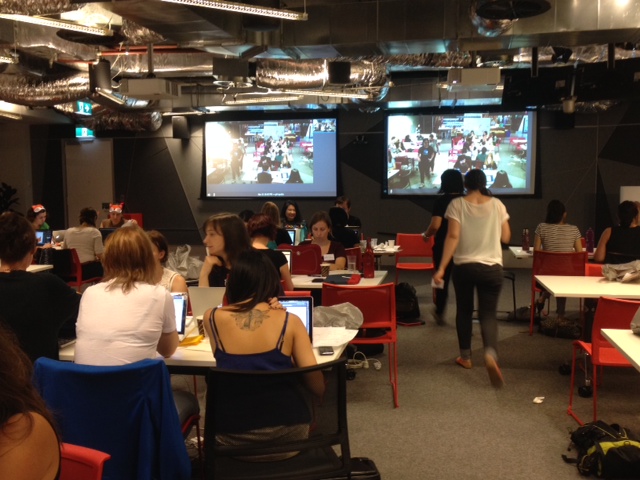
Everyone hard at work

It was the first hackathon for quite a lot of people, and it was great to see people getting involved in an event they might not otherwise attend.  Tickets for the event were sorted into several types:

  • Developers (the majority of the tickets)
  • UX/Designer
  • Non-technical

People were encouraged to form teams of about 5 people – 3 developers, 1 ux person, and one non technical – with the goal that your devs can build, the UX person makes it look amazing, and your non-technical person can coordinate and concentrate on your presentation (following excellent advice laid out by Kris just a month ago on presenting your hackathon project.)

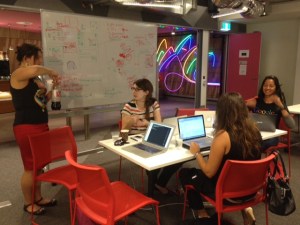
Team Disasterama (minus me)

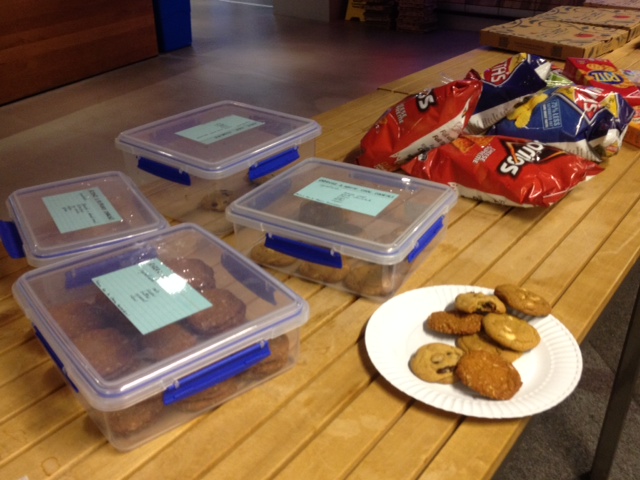
I was also amazed at the generous catering – pizza, caffeine, snacks, lots of cookies made by team mate Denise, and a decidedly un-male breakfast spread of yoghurt, muesli and fresh-cut fruit!

snacks aplenty

The result? 50 women in 11 teams competed for some great prizes donated by Google, Atlassian, Microsoft and Razorfish. There were some fantastic team hacks presented, and I personally enjoyed:

  • Mini Jobs – finding odd jobs for younger people to do to boost their confidence/skills and earn some pocket money
  • Share the Paw Paw – crowdsourcing locations around your neighbourhood where fruit and vegetables are freely available, or if you have a surplus to give away
  • Coffee Run – formalising coffee rounds in the office, including keeping tabs of who owes who

HOWEVER… our team of Denise Fernandez, Luciana Carrolo, Kim Chatterjee, Anna Zaitsev and myself won first prize with our “Mission Possible” app!! The site is designed to connect volunteers with coordinators to assist with disaster relief. The amazing prezi designed by Anna and Kim describes the idea in detail.

The source code is available on GitHub. The app was designed to be realtime so that volunteers can see up-to-the-minute information about where their help is needed, and in our demo we used two screens to great effect (realtime updates are always a crowd pleaser!). It was written using node, socket.io, handlebars, google maps, twitter bootstrap and a lovely set of custom icons designed by Kim.

A screenshot from our app shows a shaded area where the “disaster” has occurred (an oil spill), and a point which is the muster point for volunteers to go to to help (save the penguins!). Everything updated in real time from a master coordinator, who would add extra muster points and specify numbers of volunteers that should be at each point.

Mission Possible

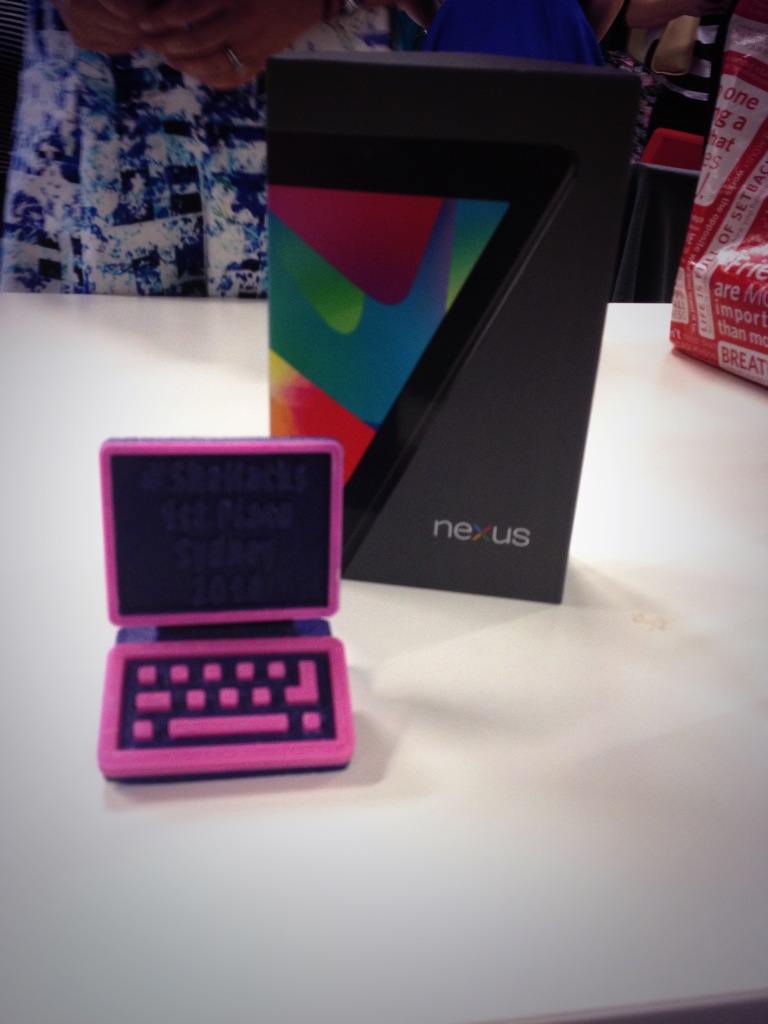
Our prize was a Nexus 7 tablet and a 3D printed trophy, which was a pink computer.

Hello, computer!

I was pretty happy with the outcome of that! It’s the third hackathon in a year that I’ve participated in and won prizes for.  I really love the energy and creativity that comes out of such an intense situation, and it’s a lot of fun to see what everyone else does in such a short time as well.

Thanks very much to Girl Geek Sydney for a great event!

Save the penguins!